
HACKSU WORKSHOP Logo

HOMELABBING 101

AND RUNNING YOUR OWN LOCAL AI
•  Ian: homelabbing
•  Meheraj: local AI

Workshop poster
[poster.png goes here]
01 - WHAT IS A HOMELAB Logo

WHAT IS A HOMELAB?

  • Any hardware you run at home to host services, learn, and experiment
  • It can be one old laptop or a full rack; size doesn't matter
  • It's yours to break, so you can try things without risking anything important
Note: If you've ever run a Minecraft server for friends, you've run a homelab.
02 - WHY Logo

WHY SHOULD I HAVE ONE?

Hands-on experience

Real, practical experience you can't get from a tutorial. Things break and you fix them.

Learn

Linux, networking, containers, and other skills employers actually ask about.

Own your stuff

Media, files, passwords, and photos on hardware you control.

Save money

Replace subscriptions: cloud storage, streaming, VPNs.

03 - MY LAB Logo

MY LAB AT A GLANCE

Dell R740 - $460

  • Single 32-core CPU
  • 192 GB DDR4
  • ~20 TB storage

Also in the lab

Router, switch, NAS, UPS (not all clear in the photo)
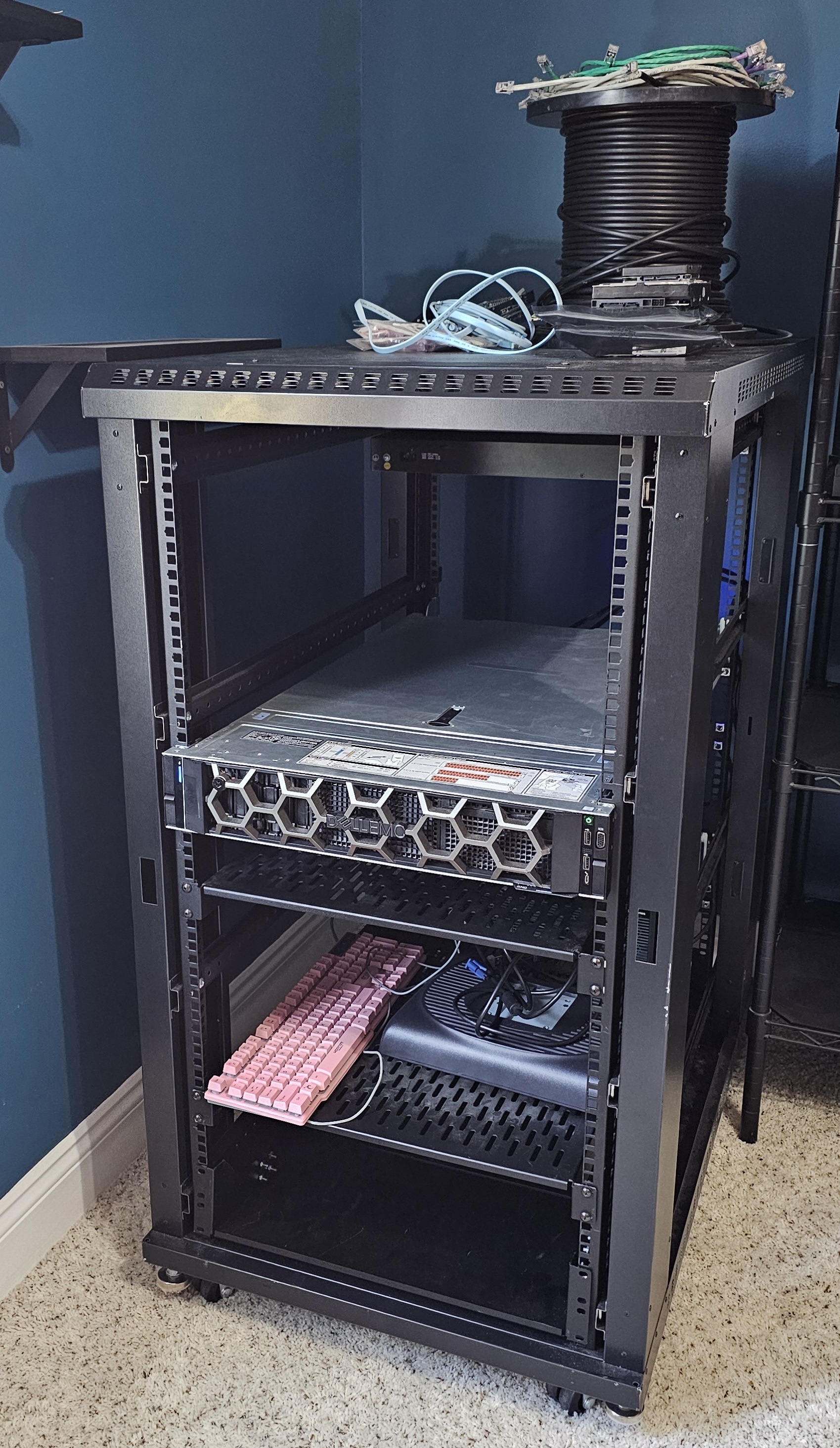
Total spent so far: $1,549
Ian's server rack
04 - HARDWARE Logo

WHERE CAN ANYBODY START?

Free / cheap

An old laptop or desktop, a Raspberry Pi.

Sweet spot

Used mini PCs and office desktops.

Me: I started with a Dell OptiPlex from an office sale.

Expensive / harder

Enterprise servers from Facebook Marketplace or eBay.

Me: found a steal on the R740 on Facebook Marketplace.

Note: Power usage matters. Ideally your lab runs 24/7.
05 - OS LAYER Logo

BARE METAL VS HYPERVISOR

Bare metal

Install Ubuntu or Debian and run things directly.

Simplest option, and it works on anything.

Hypervisor

Run many VMs and containers on one machine, with snapshots to undo mistakes.

Free (Proxmox), but needs more RAM and more to learn.

My lab: Proxmox, running 15 VMs (more on that in a few slides)
06 - NETWORKING Logo

NETWORKING AND REMOTE ACCESS

1. Static IP

Give your server a static IP and reserve it on your home router so its address never changes.

2. Port forwarding

Only forward what you have to, to a service you keep updated.

Never expose:

SSH 22 RDP 3389 SMB 445 DB 3306 / 5432 Proxmox 8006

Usual exception: web 80 / 443, through one reverse proxy.

3. Remote access

Skip port forwarding entirely with a tunnel or VPN:

Tailscale WireGuard Cloudflare Tunnel
My lab: Tailscale with an exit node whose DNS runs through Pi-hole, so I get ad blocking anywhere. HAProxy handles incoming HTTP for my web server.
07 - ADD-ONS Logo

EXTENSIONS AND ADD-ONS

Storage

Add a NAS for external storage, or use the server's internal RAID controller.

Backups

RAID is not a backup. Follow 3-2-1:

  • 3 copies
  • 2 media types
  • 1 offsite

Me: setting up automatic backups of all my data to the NAS.

UPS

Power can go out at any moment. A UPS (battery backup) keeps the server up long enough to shut down non-essential VMs safely and keep essential ones running.

Me: Proxmox start/shutdown order decides what goes down first.

08 - SELF-HOSTING Logo

NOW HOST STUFF

Media / files

Jellyfin / Plex, Nextcloud

Utility

Pi-hole / AdGuard, Home Assistant, password manager

Projects

Websites, game servers

Learning

Git server (Gitea), monitoring (Uptime Kuma, Grafana)
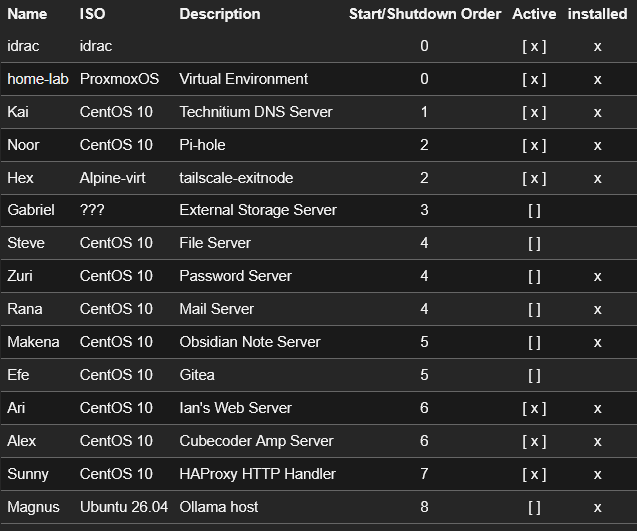
Ian's Proxmox VM list my Proxmox VMs
HANDOFF Logo

LOCAL AI

WITH MEHERAJ
Remember the Ollama host VM on my list? That's where we pick up.
END Logo

QUESTIONS?

IAN  ·  MEHERAJ